📱 1. M-Workpermit System
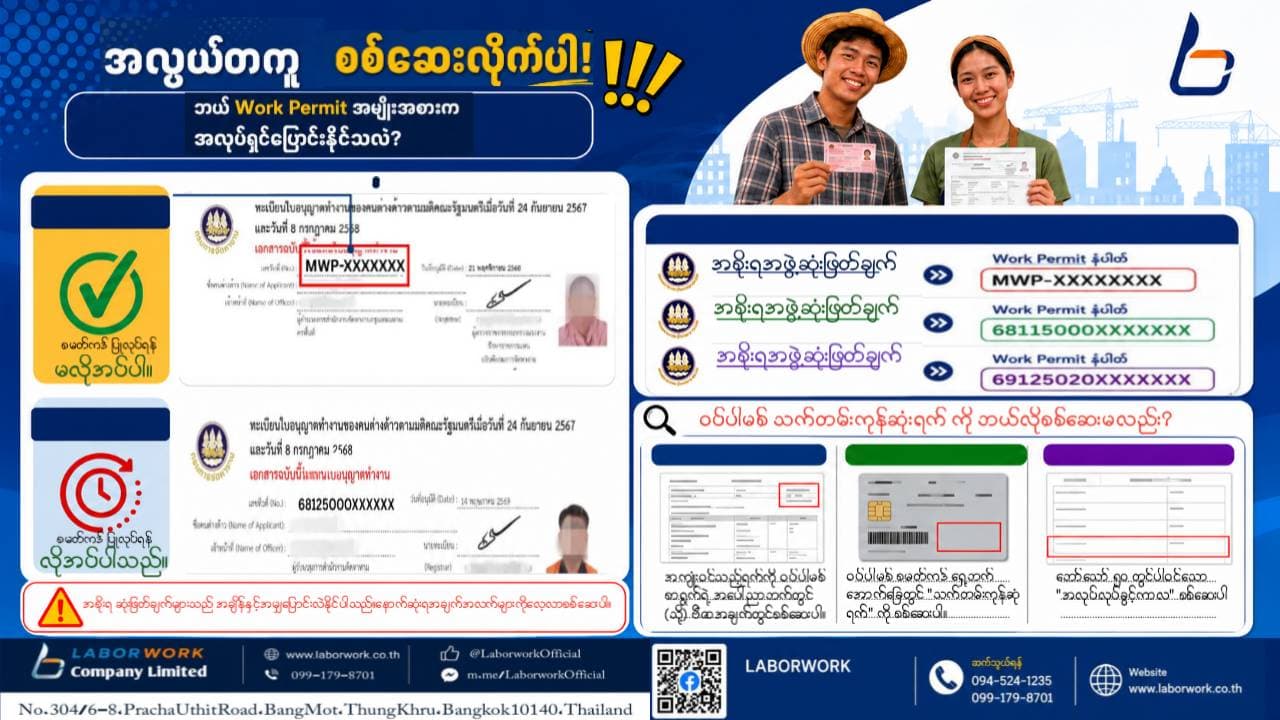
Once your visa information has been updated in the system and you have downloaded the updated Work Permit (PDF) showing your Visa Stamp Number, you can change employers immediately without obtaining a Smart Card.
Applicants under this system:
Cabinet Resolution dated 24 September 2024
Cabinet Resolution dated 8 July 2025
Reference Number Format:
MWP-XXXXXX
Note: Under these Cabinet Resolutions, Work Permits may be issued through either the M-Workpermit or E-Workpermit system.
💳 2. E-Workpermit System
After your Work Permit registration has been approved, you must first attend your appointment and receive the Smart Card before you can change employers or complete other work permit transactions.
Applicants under the E-Workpermit system are divided into three Cabinet Resolutions:
11 November 2025 → Reference No. 68115000XXXXXX
2 December 2025 → Reference No. 69125200XXXXXX
24 September 2024 / 8 July 2025 → Reference No. 68125000XXXXXX
⏳ How to Check Your Work Permit Expiry Date
📄 M-Workpermit (PDF)
Check the "Valid Until" field located in the upper-right corner or within the Visa Information section.
💳 Smart Card (E-Workpermit)
Check the back of the Smart Card for the "Expiry Date" or "วันหมดอายุ".
📑 Form Bor Tor 50 (บต.50) / Work Permit Registration Record
Check the section labeled "Period of Work Authorization" (ระยะเวลาการอนุญาตทำงาน).
⚠️ Important Reminder
Always check your Work Permit at least 30 days before its expiry date.
If your Work Permit has already expired, you cannot proceed with an employer change immediately, and additional procedures may be required.
📞 Need Help with Work Permit or Labor Documentation?
Phone:
099-179-8701
094-524-1235
061-778-7705
Line Official:
@LaborworkOfficial
Facebook:
LaborWork Company Limited
Website:
www.laborwork.co.th